Plans and billing
How plans work, what "additional revenue" means, and how to start, change or cancel your plan.
Every plan includes every feature — every deal type, every design option, A/B testing and analytics. Plans differ only in how much additional revenue your deals bring in each month. Every plan starts with a 14-day free trial (one per store).
| Plan | Monthly | Yearly (2 months free) | Additional revenue included each month |
|---|---|---|---|
| Starter | $24 | $240 | up to $1,000 |
| Growth | $49 | $490 | up to $5,000 |
| Pro | $89 | $890 | up to $10,000 |
| Business | $149 | $1,490 | up to $30,000 |
| Plus | Custom pricing | — | more than $30,000 |
What "additional revenue" means
Additional revenue is what your deals added beyond the one item the shopper came for. For each order with a deal, take the deal's items (before tax) and subtract one item at full price.
- A $10 item sold as "2 for $16" adds $6 — the shopper came for one item ($10) and spent $16.
- A shopper who buys a single item adds $0.
So you're only ever counted on the extra sales the app brings in. It resets on the 1st of every month, in your store's currency.
Note: Analytics shows deal sales — the full value of orders with deals — which is a bigger number. Billing uses additional revenue only.
Your Billing page
Open Settings → Billing.
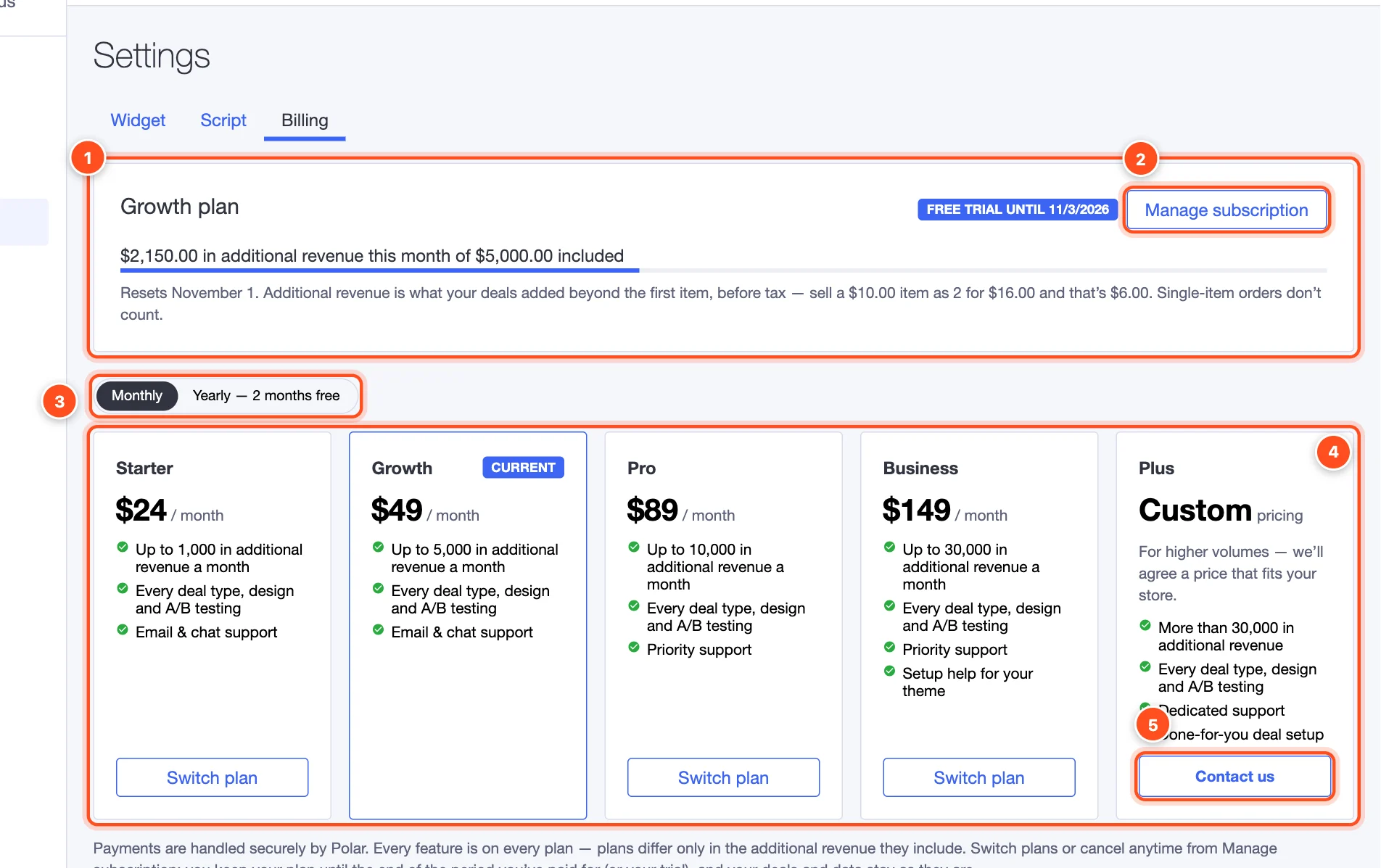
- Your plan and this month's additional revenue, with a bar showing how much of your plan you've used and when it resets.
- Manage subscription — change plan, update your payment method, see invoices, or cancel. It opens a secure billing portal.
- Monthly / Yearly — yearly plans give you two months free.
- The plans. Your current plan is marked Current; Switch plan moves to another one.
- Plus — Contact us. For stores with more than $30,000 in additional revenue a month, we agree a price that fits your store, with dedicated support and done-for-you deal setup.
Start, change or cancel
- Start — click Start free trial on any plan (see Install and set up). You won't be charged until the trial ends, and you can cancel before then.
- Change — click Switch plan on another plan, or use Manage subscription. Changes are prorated.
- Cancel — Manage subscription → Cancel. Your plan stays active until the end of the period you've paid for (or your trial).
What happens if…
…I go over my plan's limit? Your live deals keep running — shoppers never notice. You'll see a message in the app. After a 7-day grace period, publishing new deals and starting new tests pauses until you upgrade or the month resets. The app recommends the plan that fits your sales.
…my plan or trial ends? Your deals are taken off your storefront and checkout, but kept exactly as they are. Start a plan again and they go back live as they were.
…I haven't started a plan yet? You can build and preview as many deals as you like. They go live once you start your trial.
Payments are handled securely by Polar. Questions about billing? Email support@feedbackflowhq.com.